AmiMasterGearCE 1.2
Master System + Game Gear emu, community
Sin valoraciones todavía.
Entra para valorarlo.
Short:        Master System + Game Gear emu, community
Author:       Juan Antonio Gomez Galvez, z00p
Uploader:
Type:         misc/emu
Version:      1.2
Replaces:     misc/emu/AmiMasterGearCE.lha
Requires:     AGA, 68020+
Architecture: m68k-amigaos >= 3.0.0
Distribution: Aminet

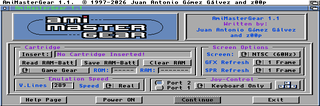
AmiMasterGear is a Sega Master System and Game Gear emulator for AGA
Amigas, in 68020+ assembly, with sound, battery saves, frozen games and
CD32 pads. This is a community version by Juan Antonio Gomez Galvez and
z00p, made and published with Juan's permission.

Juan's last public version on Aminet is 0.91 (misc/emu/AmiMasterGear,
2009). In 2026 he sent his sources for the community to carry on; this
version is built from his 0.8 source and keeps his menu, his Z80 and his
display. His own uploads stay on Aminet.

Source and issues: https://github.com/z00p/AmiMasterGear

1.2 changes
-----------
- The Master System II and Game Gear's 224-line picture: Micro Machines
  (Master System and Game Gear) and Micro Machines 2 (Game Gear) race
  in it and the track no longer wraps. The picture grows upwards, so
  192-line games stay where they were. PAL and NTSC.
- Without a prefs file Port 2 starts on CD32 Joypad (1.1: Keyboard
  Only). Saved prefs still win; the keyboard always works.
- The Help page shows the CD32 buttons as they are since 1.1.
- Del gives one Pause per press (1.1 gave two: the game paused and
  carried straight on).
- Overlapping sprites are drawn as the console draws them, so the cars
  and boats in Micro Machines (SMS, GG) have their colours (1.1:
  grey). "Sprites Priorities" in the menu, now on by
  default.
- Background tiles marked "in front of sprites" cover them, as on the
  console (Defenders of Oasis' dialogue boxes). "Background
  Priorities" in the menu, now on by default.
- Prefs saved by 0.8 or 1.1 get both priority options switched on when
  loaded; everything else in them is kept. 1.2 prefs keep your choice.
- Player 2: Joy-Control Port 1 on CD32 Joypad or KTRL CD32+ turns
  player 2 on (1.1 also needed "JoyStick 2 ON", so a pad in port 1
  did nothing).
- Periodic noise (kick drum and bass in many homebrew games) about
  5.5 dB louder, in balance with the tunes as on the console.

Speed on a 68030/50
-------------------
Measured in WinUAE on a 68030/50 setup calibrated against a real
Blizzard 030/50, not on a real 030. Sonic, Shinobi, Alex Kidd, Sonic GG
and Micro Machines (SMS and GG, in a race) run at full speed, NTSC and
PAL. Without the frame limit Micro Machines (SMS), the slowest, reaches
128% of full speed on NTSC and 156% on PAL. The 224-line picture costs
about 2%, reading a CD32 pad about 5%, drawing overlapping sprites in
order about 9%, the background priority about 1.5%.

1.1 changes
-----------
- Cartridges of any size up to 4 MB load (0.8 refused sizes that were
  not a multiple of 32 KB).
- Codemasters cartridges run (Micro Machines, Micro Machines 2 GG).
- Bank switching through IX/IY and SET/RES reaches the mapper, as on the
  console: Electronic Dreams and Razing Core no longer stay black.
- Two cartridge RAM banks: Shining Force - The Sword of Hajya starts.
- Black Sea Treasure Hunters plays: TMS9918 text and Graphic II modes,
  the 8 KB RAM mirror, the I/O port mirrors and real VDP status flags.
- Master System white at full brightness; Realtime Palette Refresh on by
  default; NTSC (60 Hz) by default (saved prefs still win).
- Sound chip: the latch/data protocol as on the chip, 2 dB volume steps,
  noise at its own rate and periodic noise (Jumping Jack'son on pitch).
- CD32 pads: a new reader; "KTRL CD32+" setting for the KTRL CD32+ and
  the Mega Multi adapter. Red = 1, blue = 2, green = Pause, yellow =
  Start (Game Gear), Play = Pause and Start, shoulders = back to the
  menu. One pause per press.
- Insert opens the Cartridges drawer, Load/Save Frozen the Frozen
  drawer; a failed frozen save or load gives a message.
- PadTest.sms and PadTest.gg pad test cartridges.

Tried on real hardware
----------------------
On an A1200 with a PiStorm, AGA screen, sound from Paula: the 224-line
picture (Micro Machines on the Master System and Game Gear, Micro
Machines 2 on the Game Gear, NTSC and PAL), the sprite colours and the
background priority (Micro Machines, Defenders of Oasis, Sonic, Shinobi,
Wonder Boy III), Alex Kidd, Columns, GG Aleste II, the Help page, Pause
from the Del key, battery saves (Shining Force, Defenders of Oasis),
frozen games, Black Sea Treasure Hunters, CD32 pads in both ports (a
KTRL CD32 and a PlayStation pad on a CD32 adapter, with PadTest), the
drums in Jumping Jack'son, and prefs from 1.1 getting both priority
options switched on. Not tried on hardware: the Port 2 default without
a prefs file (WinUAE only).
No real 68030 was to hand: its speed is the WinUAE measurement only.

Known differences
-----------------
- 240-line picture (PAL Master System II only): not done. No game in
  our test set uses it.
- Sprite collision flag in the Master System's own mode: still 0.8's.
- An occasional one-frame black flicker during play, seen on an A1200
  (Micro Machines). Cause not yet found.
- Rhythm sounds made from the noise channel can sound rough next to the
  console (heard in Jumping Jack'son's music). Being looked into.
- A thin line can show at the left edge of the picture on bright screens
  on real AGA (also in 1.1).
- Not supported: FM sound unit, light gun, paddle, 3-D glasses, Game
  Gear link cable.

Install
-------
Unpack AmiMasterGear-1.2 (this archive) and start AmiMasterGear in the
AmiMasterGear drawer. With a CD32 pad in the joystick port nothing needs
setting; with a joystick pick "Amiga JoyStick" in Joy-Control and Save
Prefs. No games are included: use cartridge images you may legally
have.

Credits
-------
Juan Antonio Gomez Galvez and z00p; Multivac (icons and graphics in
Juan's original); Afrotechmods / FAmiga (CD32 pad read).

Sega Master System and Game Gear are trademarks of Sega. This project
is not affiliated with or endorsed by Sega.
Comentarios
Todavía no hay comentarios.
Entra para comentar.
Desde el Amiga: abre Hangar y busca AmiMasterGearCE.
| Autor | Juan Antonio Gomez Galvez, z00p |
|---|---|
| Categoría | misc/emu |
| Tamaño | 69 KB |
| Descargas | 0 desde Hangar |
| Fecha | 2026-11-26 |
| Para | m68k-amigaos >= 3.0.0 |
| Necesita | AGA, 68020+ |
| Origen | Aminet (no lo revisamos nosotros) |
Versiones
| 1.2 | 71 KB | 2026-11-26 | 0 ? |
| 1.1 | 68 KB | 2026-11-25 | 0 ? |