StoneBench 1.5
Benchmark with online ranking, QR upload
Short:        Benchmark with online ranking, QR upload
Author:       Thorsten Kadell <stonebench@gmx.de>
Uploader:     Thorsten Kadell <stonebench gmx de>
Type:         util/moni
Version:      1.5
Replaces:     util/moni/StoneBench.lha
Requires:     68000+, Kickstart 2.04+, TCP/IP stack or a phone for upload
Architecture: m68k-amigaos >= 2.0.4
Distribution: Aminet
Kurz:         Benchmark, Online-Rangliste, QR-Upload
URL:          https://sthd.de/stonebench/

StoneBench is a benchmark for all classic Amigas: from the A500 with
68000 to 68060 accelerators, PiStorm, Vampire, FPGA cores and UAE. It
measures the machine and compares it with a fixed reference, an Amiga
1200 with 68060 at 50 MHz and AGA, which has 100 points. 200 means twice
as fast.

The result can be uploaded to the website, where it is ranked next to
comparable machines (real hardware, accelerators, PiStorm, Vampire, FPGA
and emulators each have their own list):

  https://sthd.de/stonebench/

No network on your Amiga? StoneBench shows the result as QR code on the
screen. Scan it with a phone and the result goes to the website from
there.

Features
--------

- One executable for 68000 to 68060 and 68080. CPU and FPU specific code
  is chosen at runtime.
- Test groups: CPU (integer, mul/div, branches, ...), FPU, memory (chip,
  fast, slow ram, copy and read/write speed), chipset (blitter, c2p into
  chip ram), graphics (OS drawing, RTG if present), disk (read, optional
  write) and OS (memory allocation, messages, task switches).
- Three scores: Workbench (CPU, FPU, fast memory, graphics, OS), Oldschool
  (CPU, chip ram, blitter, native graphics) and Newschool (CPU, FPU,
  fast memory, chunky output by c2p or graphics card). Disk is shown
  separately.
- Detects CPU, FPU, MMU, clock, chipset, memory, Kickstart and Workbench
  version, RTG system and emulators, on real hardware and PiStorm the
  Amiga model (A500/A2000, A600, A1200, A3000, A4000, CD32, CDTV) and on
  a Vampire the board (V500, V600, V1200, Firebird, Icedrake, Manticore,
  V4SA, A6000).
- What can not be detected can be chosen in the window: the model, the
  emulator (WinUAE, FS-UAE, Amiberry, ...) or the FPGA system (MiSTer,
  MiST, Tang Nano, ...). Before an upload StoneBench asks for it once if
  nothing was detected or chosen; Skip uploads without it.
- GadTools window or Shell mode with ReadArgs options.
- Upload over any bsdsocket.library stack (Roadshow, AmiTCP, Miami,
  Genesis), plain http. Without network the result is shown as QR code
  and uploaded with a phone.
- Installs nothing, writes nothing to your disks (unless you switch on
  the disk write test). The results go to RAM:StoneBench.txt.

How it measures
---------------

Every test is first calibrated, so that one run takes a fixed time on
the tested machine. Then it is measured 5 times (3 times in the quick
test) with timer.device (E-Clock) and the median is taken. Each test is
divided by the value of the reference A1200/060, so every test has 100
points there. The group scores and the three scores are geometric
means.
The scores are calculated on the server from the raw values, each
result page shows every single value.
By default multitasking is off (Forbid) during the cpu, fpu, memory and
chipset tests, so the machine looks frozen for about a second per test.
The reference values were measured the same way. NOFORBID or the switch
in the window keeps multitasking on.
During the blitter tests the display is switched off for a moment and
the screen turns grey, so the result does not depend on the screen mode
of your Workbench. The chip ram tests run with your Workbench screen
shown: a screen with many colours or a high resolution takes chip ram
time away and makes them slower.

Upload without network
----------------------

Amigas without TCP/IP stack or network card can still take part. After
the run press "QR code" in the window (or start StoneBench.exe with the
QR option). The result is shown as QR code on an own screen. Scan it with
the camera of a phone: the phone opens the website with the result,
"Upload" there stores it. The code holds the complete result, signed
like a normal upload. A click or a key closes the screen.
If Upload in the window fails because there is no network, StoneBench
offers the QR code by itself.
If the phone reports a bar code instead (EAN, product code), use the
normal camera app or switch off the 1D codes in the scanner app.

Boot disk
---------

StoneBench.adf is a bootable floppy disk image with StoneBench.exe and
this text, for Amigas without hard disk (Kickstart 2.04 or newer).
Write it to a floppy, boot from it and the window opens. Floppies are
not used for the disk tests, the QR code works for the upload.
Note: the floppy boots a bare system without SetPatch and without the
CPU libraries (68040.library, 68060.library) of your Workbench. On
accelerators the caches and the FPU may then not be set up like in
daily use, so some results can be much worse than with your normal
system. For results to compare, run StoneBench.exe from your normal
Workbench; use the floppy for machines without hard disk.

Usage
-----

Copy the StoneBench drawer (or just StoneBench.exe) anywhere and start
it from the Shell or the Workbench, StoneBench.exe has its own icon.
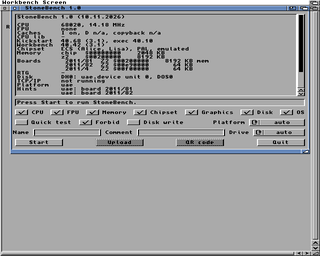
A window shows the detected system, Start runs the
tests, Upload sends the result, QR code shows it for a phone. A full run
takes 1 to 2 minutes on the reference A1200, longer on slow machines.
The quick test needs a few seconds there.

Shell template:

  StoneBench.exe ALL/S,QUICK/S,TESTS/K,DISK/K,DISKWRITE/S,NOFORBID/S,
                 PLATFORM/K,MODEL/K,NAME/K,COMMENT/K,UPLOAD/S,QR/S,
                 SERVER/K,WINDOW/S

  ALL                 all tests, without window
  QUICK               quick test
  TESTS=cpu,mem,...   only these groups (cpu,fpu,mem,chipset,gfx,disk,os)
  DISK=DH1:           partition for the disk tests
  DISKWRITE           also test writing (needs 4 MB free, cleaned up)
  NOFORBID            multitasking stays on during all tests
  PLATFORM=...        real, uae, pistorm, vampire or fpga
  MODEL=...           real hardware and PiStorm: A500/A2000, A600,
                      A1200, A3000, A4000, A4000T, CD32, CDTV
                      uae: WinUAE, FS-UAE, Amiberry, Amithlon, Other
                      vampire: V500, V600, V1200, Firebird, Icedrake,
                      Manticore, V4SA, A6000, Salamander, Other
                      fpga: MiSTer, MiST, "Tang Nano", Chameleon,
                      Replay, UnAmiga, AmiCube, Other
  NAME=, COMMENT=     shown on the website
  UPLOAD              upload after the run
  QR                  show the result as QR code, upload it with a phone
  WINDOW              open the window with these options preset

Examples:

  StoneBench.exe ALL NAME="Thorsten Kadell" UPLOAD
  StoneBench.exe QUICK TESTS=cpu,mem
  StoneBench.exe ALL QR

Return codes: 0 ok, 5 stopped with Ctrl-C, 10 error or upload failed,
20 could not start.

Privacy
-------

An uploaded result contains the hardware, the measured values and the
name and comment you entered, nothing else. The website does not store
your IP address, only a salted hash to limit uploads.

Developed with AI
-----------------

StoneBench was written with the help of an AI (Claude by Anthropic),
under my direction and with all design decisions made by me. It was
tested on a real A1200 with 68060/50, on a PiStorm and under WinUAE.
Please report anything that looks wrong.

Archive contents
----------------

  StoneBench.info                drawer icon
  StoneBench/StoneBench.exe      the program
  StoneBench/StoneBench.exe.info program icon
  StoneBench/StoneBench.readme   this text
  StoneBench/StoneBench.adf      boot disk image with the program

Website, ranking and the latest version: https://sthd.de/stonebench/

Credits
-------

StoneBench is written in C++ and 68k assembler, built with the
m68k-amigaos GCC and vasm. The c2p routines are by Mikael Kalms,
public domain.

History
-------

1.5   - New window: the three scores as columns with big numbers and
        bars, the StoneBench logo next to them.
      - Progress as a stone wall: one stone per test.
      - Icons for the program, the drawer and the boot disk.
      - Tighter option rows on 640x256 screens, so the list shows
        more lines.
      - Reminder before Upload or QR code when no name is entered.
      - Something happens when you leave it alone for a minute.
      - 92 MHz (Vampire V4 clock setting) is recognised as usual clock.
1.41  - The model comes from the chips: an A1200 or A4000 with AGA
        switched off in the early startup menu is no longer shown
        as A600 or A3000.
      - CD32 detected by its Akiko chip.
1.4   The website only takes results of 1.2 and newer, please update.
      - Groups are now the parts of the three scores (chip and fast
        memory, blitter, native screen, best screen, chunky output).
      - Blitter tests run with the display off, so the screen mode of
        the Workbench does not change the result.
      - Detects the Amiga model (A500/A2000, A600, A1200, A3000, A4000,
        CD32, CDTV) and the Vampire board, MODEL= to choose it.
      - On UAE the emulator can be chosen (WinUAE, FS-UAE, Amiberry,
        ...), Amithlon and the UAE version are detected. On FPGA
        systems the system can be chosen (MiSTer, MiST, Tang Nano, ...).
      - Asks for the model before an upload if nothing was detected.
      - A blitter far faster than a real one (immediate blitter of UAE,
        Amithlon) counts in no score.
      - Graphics write test and slow ram test now also on Kickstart 2.x.
      - New QR code format, the website reads the codes of 1.2 and newer.
1.0   First Aminet release.

Contact
-------

Bug reports, questions and results that look wrong:
stonebench@gmx.de
Please add RAM:StoneBench.txt or the number of the uploaded result.
Desde el Amiga: abre Hangar y busca StoneBench.
| Autor | Thorsten Kadell <stonebench@gmx.de> |
|---|---|
| Categoría | util/moni |
| Tamaño | 245 KB |
| Fecha | 2026-11-15 |
| Para | m68k-amigaos >= 2.0.4 |
| Necesita | 68000+, Kickstart 2.04+, TCP/IP stack or a phone for upload |
| Web | https://sthd.de/stonebench/ |
| Origen | Aminet |
Versiones
| 1.5 | 245 KB | 2026-11-14 |
| 1.0 | 56 KB | 2026-11-12 |